Outcome
100%
Approved for production following live stakeholder review
Client
The University of St. Augustine for Health Sciences (USAHS)
Role
UX Designer
Timeline
3 weeks
USAHS had a growing library of high-quality video content and a real SEO opportunity to match, but no centralized place to surface it. The gap wasn't in the content. It was in the discovery.
Problem
Solution
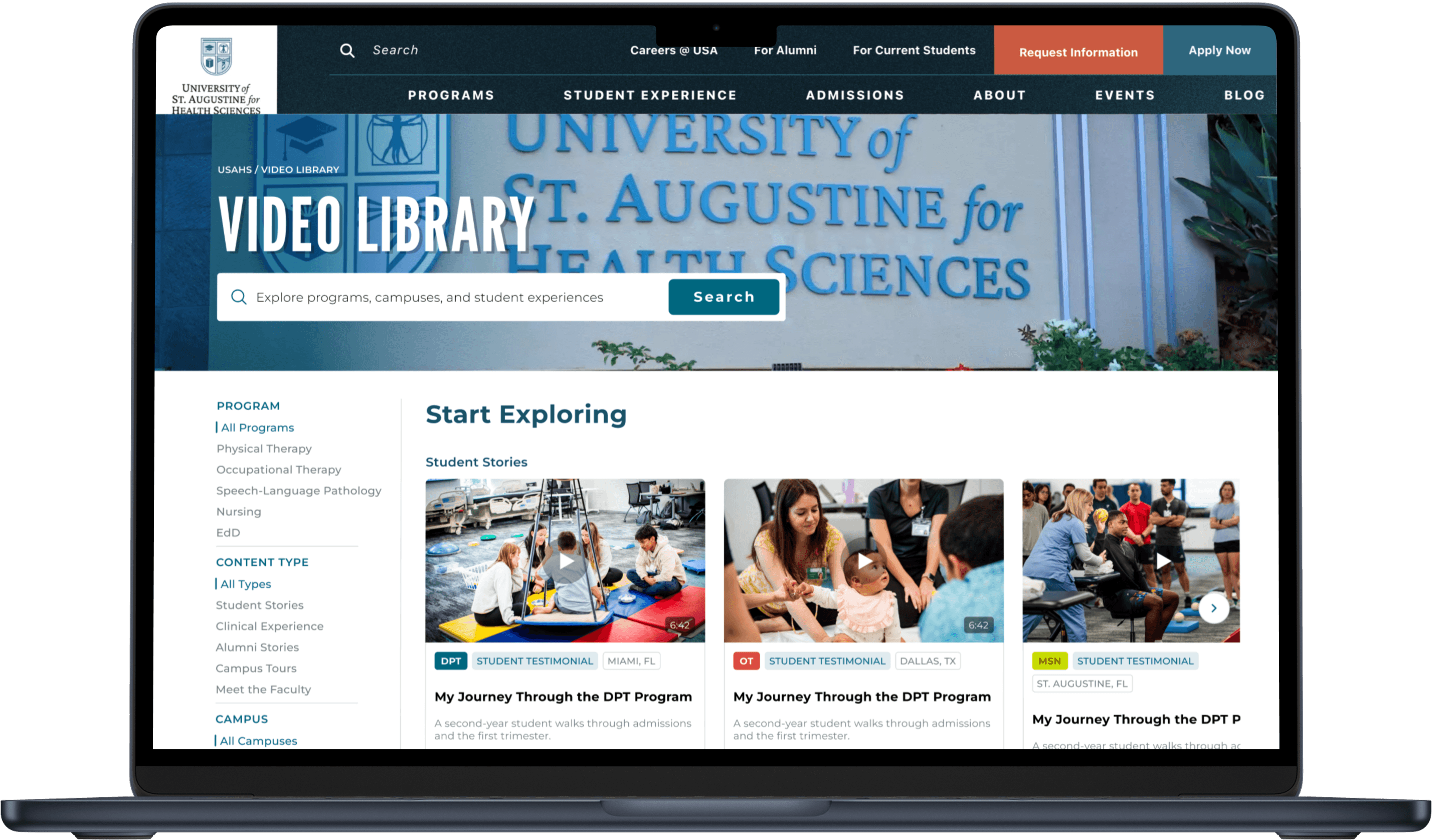
A centralized video library built around how students actually search for content: filterable by program, campus, and content type, and designed around the mental models students already bring to video. One place for every student, at every stage of their journey, to find content that feels made for them.
What We Thought vs. What We Found
The initial framing was straightforward: the SEO specialist flagged a ranking opportunity and the content team needed a home for videos that were already being produced. This started as a business need, not a student one.
Research is what brought the student into the picture. After 3 user interviews and a survey with 24 responses, the scope of the problem shifted. Students weren't asking for more content. Many didn't know it existed at all. The ones who had gone looking left empty-handed.
A page built purely around SEO and content showcase would have missed that entirely. This wasn't just a discoverability initiative. It was a trust and discovery problem, and those require completely different design responses. That shift showed up in three specific ways.
Students don't browse. They search for themselves.
The most selected filtering preference across the survey was program-specific filtering, by a clear margin. A DPT student landing on a page full of SLP content doesn't feel like they're in the wrong section. They feel like the product wasn't built for them. Every navigation decision that followed was built around that distinction.
Search and filtering aren't competing behaviors. They're the same need.
Students were split evenly between reaching for the search bar first and filtering by program. That wasn't ambiguity in the data. It was a clear signal that both entry points had to feel equally immediate. Any design that treated one as primary and buried the other was making a decision the research didn't support
The content students trust looks nothing like branded promotional video.
One respondent said it plainly: "make it seem authentic and real and not super formal." The most requested content, student testimonials, day-in-the-life stories, and faculty expertise, shared one quality: it felt like something a real person made, not a marketing department. That insight didn't just shape content strategy. It directly challenged design decisions that were already on the table.
Research to Design Direction
What Became Clear
Five patterns came out of the research that pointed in the same direction. Students needed program-specific discoverability, equal weight between search and filtering, authentic content presentation and a clear path from video to program exploration. Together they defined what the library had to do.
Every requirement got a measurable bar: relevant content findable in under 60 seconds, an interface that competed visually with the social platforms students were already using, and a direct connection from video to program pages and application pathways.
Every bar traced back to something a real user said. When a stakeholder questioned a decision, the requirements list was the answer, grounded in student behavior rather than designer preference.
Where AI Fit Into This Workflow
This project was a collaborative effort. I worked alongside another designer and the broader creative team, with each of us exploring independent design directions early in the process. After presenting both concepts to stakeholders, the team aligned on my direction and moved forward with it. From there, my colleague contributed brand consistency and typography feedback as the designs were refined and built out.
The design started with a basic mid-fidelity structure in Figma to establish layout and hierarchy. From there, I made a deliberate call to skip the extended wireframe phase and move directly into high fidelity using Claude, an AI design tool, to generate a working prototype quickly.
That decision paid off in the room. Walking into a stakeholder review with something that looked and felt real changed the conversation entirely. Instead of asking people to imagine the experience from static frames, they could react to it. Feedback was specific, actionable, and fast.
The limitation became clear in handoff. The AI-generated output couldn't produce the clean, component-based file structure that developer handoff requires. After significant time spent trying to correct the generated Figma file, the decision became obvious: rebuild it from scratch, one component at a time. It took roughly half the time already spent trying to fix the AI output, and produced something production-ready.
The lesson wasn't that AI tools aren't useful. They're useful for a specific window of the design process: getting a vision in front of people fast and compressing the gap between idea and reaction. They're not a replacement for the craft that comes after. Knowing where that line is turned out to be its own design skill.
The Decisions That Followed
The design went in one direction. The research pulled it somewhere better.
Sidebar filter over header pills
Students came to the library with different instincts. Some reached for the search bar. Others went straight to filtering by program. The research didn't give us a dominant behavior to design around. It gave us two equally valid ones, and the design had to honor both.
Why the sidebar won
38% of students instinctively searched by keyword first. Another 38% filtered by program. Neither group was the edge case. Filter pills in the header created visual clutter and implicitly ranked one behavior over the other. On mobile, the problem was worse: pills at the top consume valuable screen space and collapse into an experience that doesn't scale across USAHS's full range of categories. A persistent sidebar keeps both tools visible and co-equal on desktop, and translates into a clean drawer pattern on mobile without sacrificing functionality as the library grows.
What got cut
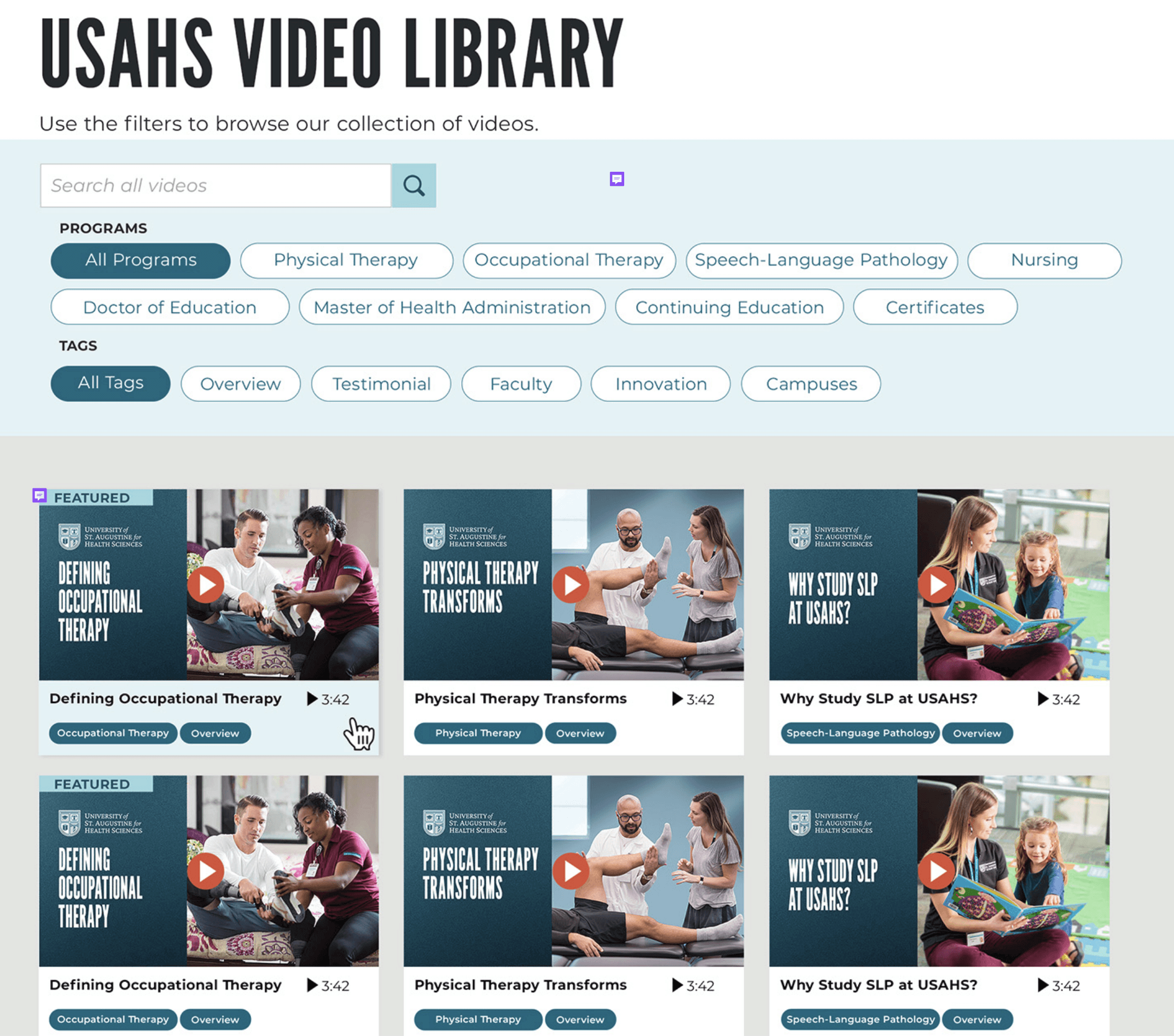
A featured video section was proposed early. The research made the case against it: students wanted to reach program-specific content as fast as possible. Surfacing one video above the rest created hierarchy that delayed that. It was removed.

Natural thumbnails over branded treatments
An earlier design used heavily branded thumbnail overlays across the video grid. Students described promotional-feeling content as something they scrolled past instinctively, the same reflex they apply to ads. The library needed to feel like content students chose to engage with, not a page they were being marketed at.
What the research ruled out
YouTube, the platform students already trust for video, uses clean natural thumbnails as the default. Branded overlays signal marketing before a student reads a single word. Stripping them back matched the visual language students already associate with trustworthy video content and removed a barrier to engagement before it had a chance to form.
What didn't make it
The branded treatment wasn't just a visual preference. It represented a broader assumption that the library should feel like a USAHS marketing surface. The research pushed back on that directly. Students wanted authenticity over production value. The design followed the data.
My colleague's initial design used filter pills in the header and heavily branded thumbnail treatments across the video grid. Both decisions made sense in isolation. The research is what changed them.
Designing the individual video page around a familiar mental model
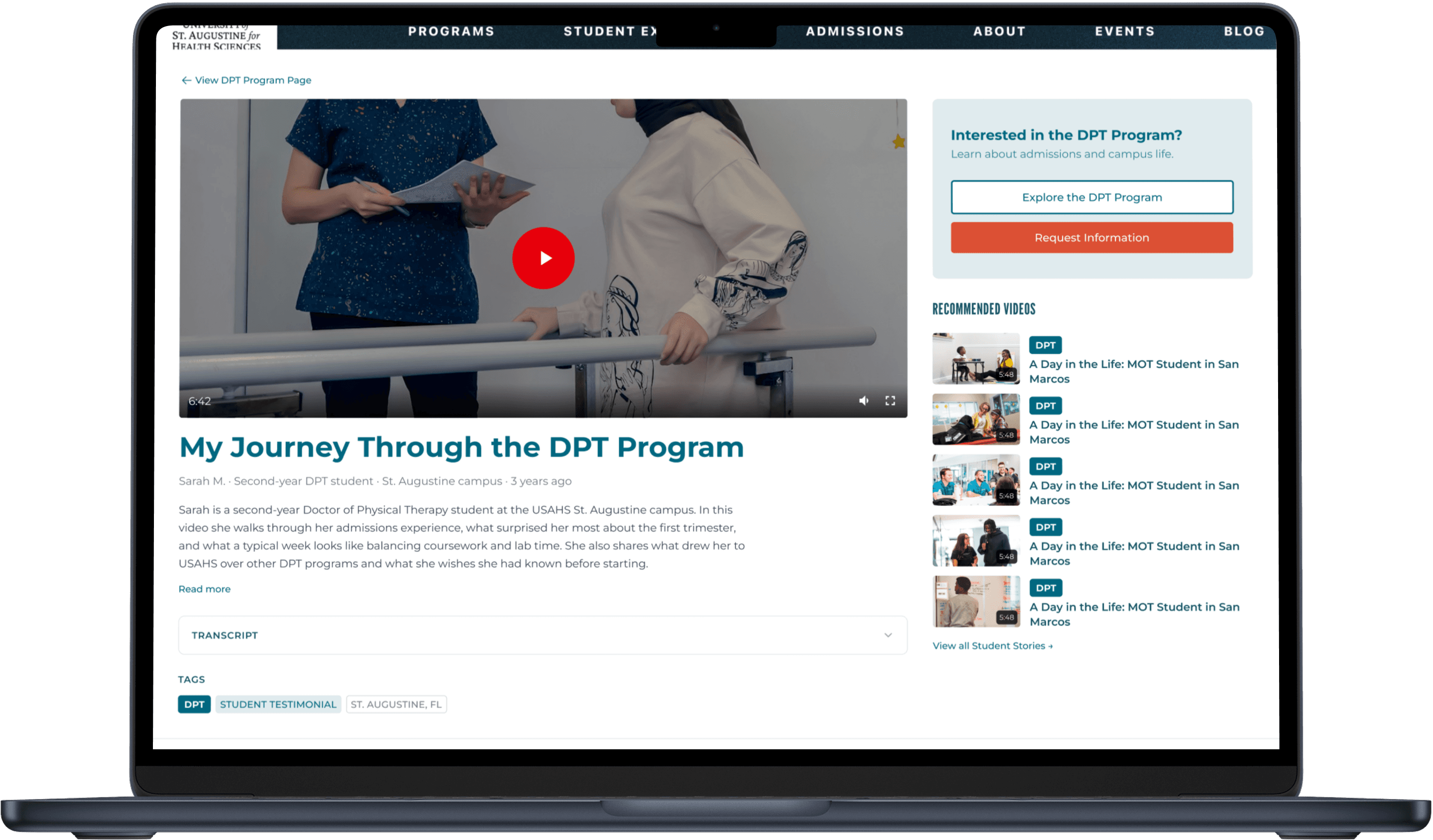
Stakeholders wanted CTAs for program exploration and information requests on individual video pages. The placement was the design challenge. Forced into the wrong position they feel intrusive. In the right position they feel like a natural next step. The solution wasn't to invent a new pattern. It was to borrow one students already understood.
How Youtube Shaped Page Structure
The individual video page was designed with YouTube as the structural model because it's the one every student already knows. The program CTA sits beside the video where YouTube surfaces channel information. Recommended videos stack below. The familiarity does the onboarding before a student reads a single label.
Added after survey feedback
54% of respondents selected a link to the relevant program page as a required feature. A collapsible transcript was added after consistent demand for captions and accessibility support appeared across the survey, accessible without cluttering the page for users who don't need it.
From Prototype to Production
The design went in front of stakeholders as a working high fidelity prototype, not a slide deck. Every decision had a research rationale behind it, which meant questions were specific and alignment came fast. The library is moving into production.
The original problem gets closed somewhere else: in the data. Each individual video page now carries an optimized title, full transcript, topic tags, and internal links to program pages. Every video that was invisible to search becomes findable. That's the SEO payoff the project was built around.
Once live, usability testing and heatmap tracking will show where students actually navigate, whether they're reaching the right content fast enough, and whether the 60-second discoverability requirement holds in practice. The design is done. The learning is just starting.
What This Project Taught Me
Building from nothing is a different design challenge than improving something that exists. There's no baseline to react to, no existing behavior to observe, and no prior decisions to interrogate. Every call had to be grounded in what the research said students actually needed, not what seemed intuitive or what had worked somewhere else.
The AI workflow added a layer to that. Using a generative tool to accelerate the vision phase and then rebuilding manually for production taught me something I'll carry into every project: the skill isn't knowing how to use the tool. It's knowing which part of the process the tool is actually built for, and having the judgment to stop using it when that window closes.